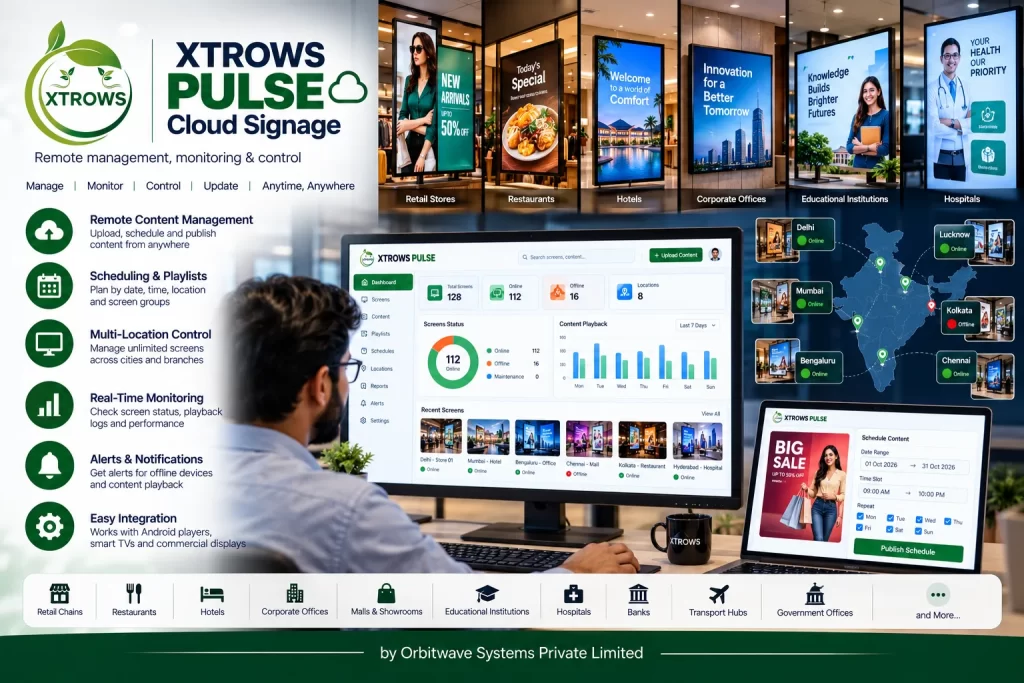
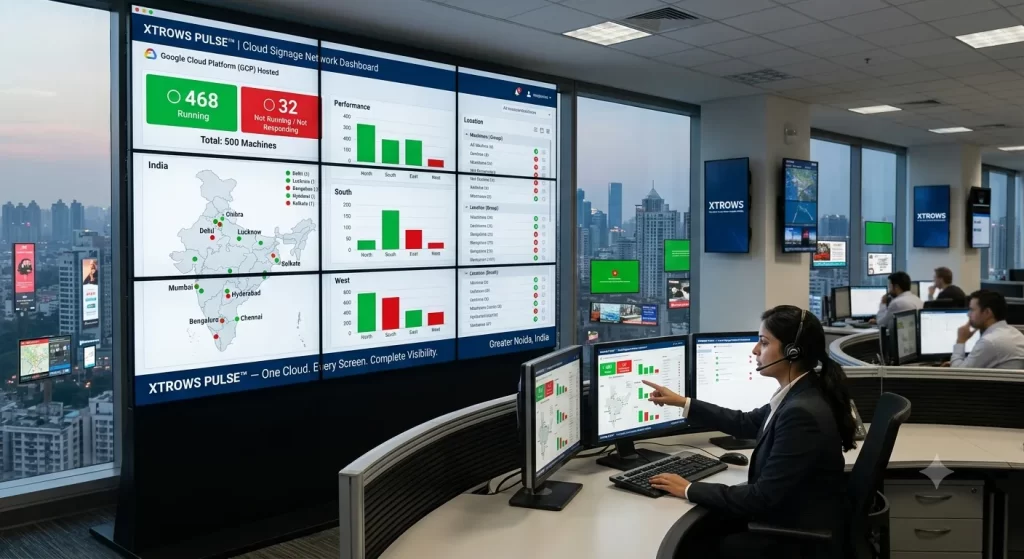
Hosted on Google Cloud Platform (GCP), PULSE provides a centralized view of connected signage machines, allowing administrators to quickly identify which machines are running and which are not responding, without physically visiting each location.
It also provides the ability to remotely restart the signage application when required.
What Makes XTROWS PULSE™ Different?
Managing 10, 50, 500 or thousands of digital signage machines across different locations can become difficult when every machine has to be checked individually.
XTROWS PULSE™ brings them into one centralized cloud environment.
From a single Admin Panel, you can:
- View connected signage machines
- See how many machines are currently running
- Identify machines that are not running/responding
- Monitor machine status
- Manage multiple locations
- Remotely restart the signage application
- Organize machines according to locations/groups
- Manage the signage network through the cloud
In simple terms:
One Admin Panel → Multiple Locations → Multiple Machines → One Cloud Platform
Centralized Cloud Dashboard
The PULSE Admin Panel provides a centralized overview of the complete signage network.
For example:
| Machine Status | Quantity |
| 🟢 Running | 468 |
| 🔴 Not Running / Not Responding | 32 |
| Total Machines | 500 |
This gives the administrator an immediate understanding of the current signage network status.
Instead of checking every display individually, the administrator can see the overall status from one single window.
Remote Application Restart
One of the important features of XTROWS PULSE™ is remote application management.
If the signage application on a connected machine stops responding or requires a restart, the administrator can send a remote restart command from the PULSE Admin Panel.
Without PULSE:
Application problem → Call local person → Visit machine → Restart application
With PULSE:
Admin Panel → Select Machine → Restart Application
This can significantly simplify remote signage operations.
Important: PULSE restarts the configured signage application. It does not switch the physical display/device power OFF or ON.
Running vs Non-Running Machine Monitoring
PULSE provides administrators with visibility into the operating status of their deployed signage machines.
The dashboard can provide information such as:
🟢 Running Machines
Machines currently communicating with the platform and operating as configured.
🔴 Non-Running / Not Responding Machines
Machines that are not currently reporting the expected status to the platform.
This makes it easier for an administrator to identify machines that may require attention.
Manage Your Entire Signage Network from One Window
Whether your displays are installed in:
- Delhi
- Mumbai
- Bengaluru
- Hyderabad
- Chennai
- Lucknow
- Kolkata
- Different branches
- Different customer locations
PULSE provides a centralized cloud management environment.
The administrator does not need to maintain separate management systems for every location.
Cloud Infrastructure on GCP
XTROWS PULSE™ is designed around a Google Cloud Platform (GCP) hosted architecture.
Typical Architecture
Admin / Operator
↓
XTROWS PULSE™ Admin Panel
↓
GCP Cloud Server
↓
Connected Signage Machines
↓
Digital Displays
This architecture allows the signage network to be centrally managed through the cloud.
Large-Scale Screen Management
PULSE is designed to support large-scale digital signage deployments.
The platform can be used to manage:
10 Screens
→ 100 Screens
→ 1,000 Screens
→ 10,000+ Screens
The practical number of machines is dependent on the deployed GCP infrastructure, database architecture, network connectivity and project configuration.
Therefore, on the website I recommend saying:
“Manage a virtually unlimited number of screens from one centralized cloud platform.”
rather than making an absolute technical claim of literally unlimited screens.
Multi-Location Management
Organizations can organize their signage machines according to:
Region
- North
- South
- East
- West
City
- Delhi
- Mumbai
- Bengaluru
Branch
- Branch 01
- Branch 02
- Branch 03
Customer / Project
- Customer A
- Customer B
- Customer C
This makes large deployments easier to monitor and manage.
Core Features
☁️ Cloud-Based Management
Centralized signage management through a GCP-hosted cloud platform.
🖥️ Machine Status Monitoring
View the operational status of connected signage machines.
📊 Centralized Status Dashboard
See running and non-running machines from a single Admin Panel.
🔄 Remote Application Restart
Restart the configured signage application remotely without physically visiting the machine.
🌐 Multi-Location Management
Manage signage machines deployed across multiple cities and locations.
👥 Machine Grouping
Organize machines according to location, customer, project or other operational groups.
📈 Scalable Deployment
Designed for deployments ranging from small installations to large distributed signage networks.
🎯 Centralized Administration
One management interface for the entire signage network.
XTROWS SLIDE™ + XTROWS PULSE™
This is an important distinction for your website.
XTROWS SLIDE™
Create. Schedule. Play.
SLIDE manages the content side of digital signage:
- Content creation
- Content management
- Playlist
- Scheduling
- Playback
↓
XTROWS PULSE™
Monitor. Manage. Control.
PULSE manages the machine/network side:
- Machine monitoring
- Running status
- Non-running status
- Centralized dashboard
- Remote application restart
- Multi-location management
- Cloud management
Together:
SLIDE = Content Management
PULSE = Device/Screen Network Management
This makes the two products complementary rather than competing products.
Example: 1,000 Digital Signage Machines
Imagine a customer has 1,000 digital signage machines installed across India.
The administrator opens the PULSE Admin Panel.
Dashboard
Total Machines: 1,000
Running: 942
Not Running / Not Responding: 58
The administrator can identify the machines requiring attention and, where applicable, issue a remote application restart.
There is no need to physically check all 1,000 locations just to understand the current machine status.
Benefits
✔ One Window for the Entire Network
Manage the complete signage deployment from one centralized interface.
✔ Know Your Network Status
Quickly understand how many machines are running and how many are not responding.
✔ Remote Application Restart
Restart the signage application remotely when required.
✔ Reduce Physical Intervention
Identify issues remotely before sending someone to the location.
✔ Multi-Location Visibility
Manage machines deployed across different cities, branches and projects.
✔ Cloud-Based
Centralized infrastructure hosted on GCP.
✔ Built for Scale
Suitable for expanding digital signage networks.