
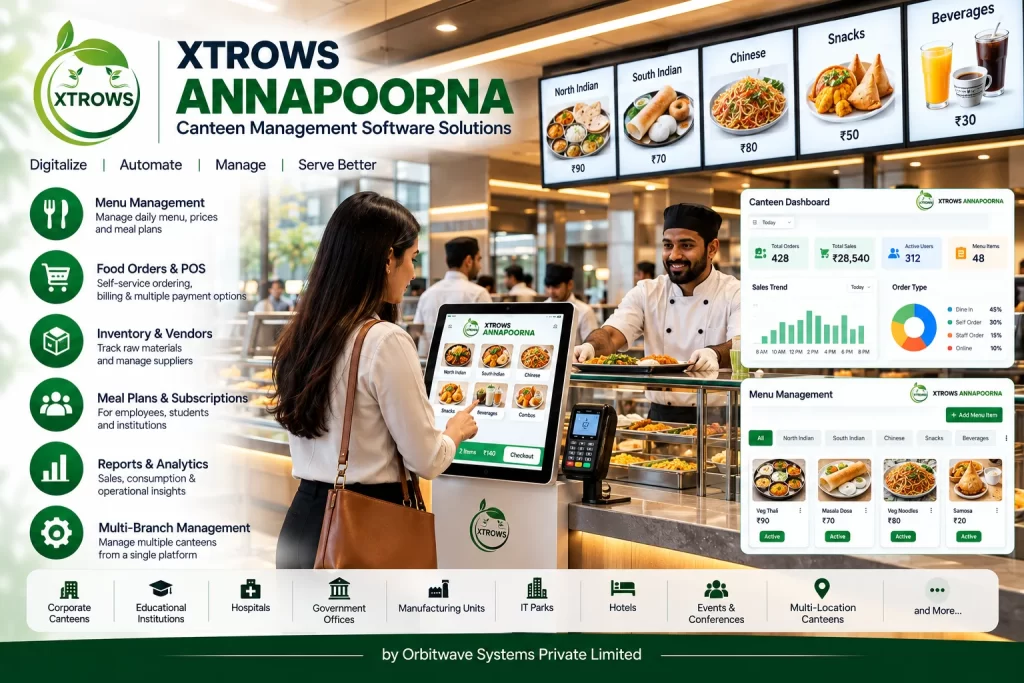
The system can help organizations manage menus, food items, orders, billing, POS operations, meal services, inventory, vendors, counters and reports through a centralized digital platform.
XTROWS ANNAPOORNA™ can also be integrated with self-service food ordering kiosks, POS terminals, digital displays, kitchen order systems and payment systems according to project requirements.
What is XTROWS ANNAPOORNA™?
XTROWS ANNAPOORNA™ is a digital Canteen Management System designed to organize the day-to-day operations of institutional and commercial food-service facilities.
It can bring different canteen activities into one platform, helping management control food menus, orders, transactions, inventory and operational records.
Typical Canteen Workflow
Menu Management → Food Ordering → Billing / Payment → Kitchen Processing → Food Collection → Sales & Operational Reports
The system can be configured according to the organization's canteen workflow.
Canteen Management System
XTROWS ANNAPOORNA™ can help manage various aspects of canteen operations, including:
- Menu Management
- Food Item Management
- Food Ordering
- POS & Billing
- Digital Payments
- Kitchen Orders
- Token / Order Management
- Inventory
- Stock Management
- Vendor Management
- Meal Management
- Reports
- User Management
Key Features
Digital Menu Management
Manage the complete canteen menu digitally.
Add and manage:
- Food Items
- Categories
- Prices
- Food Images
- Meal Types
- Add-ons
- Availability
- Daily Specials
Menu information can be updated according to operational requirements.
Canteen POS
XTROWS ANNAPOORNA™ can provide a Canteen POS System for managing food sales and transactions.
The POS can capture:
- Food Items
- Quantity
- Price
- Discounts
- Taxes
- Order Number
- Payment Status
- Order Status
Food Ordering Management
Manage food orders from different ordering channels.
Depending on the deployment, orders can originate from:
- POS Counter
- Self-Service Kiosk
- Digital Ordering System
- Authorized Staff
- Integrated Applications
All orders can be processed according to the configured canteen workflow.
Self-Service Food Ordering Integration
XTROWS ANNAPOORNA™ can integrate with XTROWS AHAAR™ — Self-Service Food Ordering & POS Management Software.
This allows the two products to work together where required:
XTROWS AHAAR™
Customer Self-Service Ordering
↓
XTROWS ANNAPOORNA™
Canteen Management & Operations
This creates a complete digital food-service environment.
Meal Management
For schools, colleges, factories and corporate organizations, the software can be configured for meal-based operations.
Possible meal categories include:
- Breakfast
- Lunch
- Evening Snacks
- Dinner
- Special Meals
Organizations can configure meal schedules according to their requirements.
School & College Canteen Management
XTROWS ANNAPOORNA™ can be used as a School Canteen Management System or College Canteen Management Software.
Possible applications include:
- Student food services
- Staff meals
- Digital menu
- Food ordering
- POS billing
- Meal management
- Food counters
- Canteen inventory
- Sales reports
The system can be configured according to the institution's food-service policies.
Factory Canteen Management
Factories with large employee populations can use XTROWS ANNAPOORNA™ to manage canteen operations.
Possible applications include:
- Worker meals
- Employee meals
- Shift-based meals
- Breakfast
- Lunch
- Dinner
- Snacks
- Meal records
- Food counters
- Inventory
- Vendor management
The system can support different workflows for organizations operating multiple shifts.
Corporate Cafeteria Management
Corporate offices can use XTROWS ANNAPOORNA™ for:
- Employee cafeteria
- Food ordering
- Meal management
- POS
- Menu management
- Vendor management
- Food counters
- Sales reports
Hospital Canteen Management
Hospitals can use the system for:
- Staff cafeteria
- Patient food services
- Visitor cafeteria
- Food counters
- Menu management
- Food ordering
- POS billing
- Inventory
Specific patient meal workflows can be configured according to project requirements.
Cafeteria Management
XTROWS ANNAPOORNA™ can also function as a Cafeteria Management Software for:
- Corporate cafeterias
- University cafeterias
- Institutional cafeterias
- Factory cafeterias
- Hospital cafeterias
- Campus dining facilities
Inventory & Stock Management
Canteen operations depend on regular monitoring of food ingredients and consumable items.
XTROWS ANNAPOORNA™ can provide inventory-related functionality for:
- Food Ingredients
- Raw Materials
- Beverages
- Packaging Materials
- Consumables
- Finished Food Items
Possible stock operations include:
- Stock In
- Stock Out
- Stock Adjustment
- Item-wise Stock
- Low Stock Monitoring
- Inventory Reports
Actual inventory functionality can be configured according to the project scope.
Vendor Management
Manage canteen suppliers and vendors through a centralized system.
Vendor information can include:
- Vendor Name
- Contact Details
- Products / Items
- Purchase Records
- Supply Information
- Payment Records
This can help organizations maintain structured supplier information.
Kitchen Order Management
Food orders can be routed to the kitchen or preparation counter according to the configured workflow.
Kitchen staff can receive information such as:
- Order Number
- Food Items
- Quantity
- Add-ons
- Special Instructions
- Order Time
- Order Status
This helps organize food preparation and order fulfilment.
Token & Order Management
Orders can be assigned an order or token number.
Example:
ORDER NO.
A125
COUNTER
03
When the order is ready, the token can be displayed on a digital screen or announced through an audio system.
Digital Order Display
XTROWS ANNAPOORNA™ can be integrated with digital displays for displaying:
- Order Numbers
- Ready Orders
- Counter Numbers
- Food Menu
- Announcements
- Promotional Content
This can be particularly useful for high-volume canteens and cafeterias.
Payment Management
The system can be configured with supported payment methods.
Possible payment options include:
- Cash
- UPI
- QR Payment
- Card
- Digital Wallet
- Integrated Payment Terminal
Payment capabilities depend on the selected payment gateway and hardware integration.
Reports & Analytics
XTROWS ANNAPOORNA™ can provide reports according to the configured deployment.
Possible reports include:
Sales Reports
- Daily Sales
- Monthly Sales
- Item-wise Sales
- Category-wise Sales
Order Reports
- Total Orders
- Completed Orders
- Cancelled Orders
- Pending Orders
Inventory Reports
- Stock In
- Stock Out
- Current Stock
- Low Stock
Operational Reports
- Counter Performance
- Meal Reports
- Vendor Reports
- Payment Reports
Canteen Dashboard
Management can use a centralized dashboard to monitor canteen operations.
A typical dashboard may include:
Today's Orders
Today's Sales
Pending Orders
Completed Orders
Low Stock Items
Active Counters
Actual dashboard information depends on the configured modules.
Hardware Integration
XTROWS ANNAPOORNA™ can be integrated with suitable hardware.
POS Terminal
For counter-based food ordering and billing.
Self-Service Kiosk
For customer-driven food ordering.
Thermal Printer
For receipts, order slips or tokens.
Kitchen Display
For displaying incoming food orders.
Digital Signage
For menus and order status.
LED Display
For large-format order calling.
QR Scanner
For supported identification or ordering workflows.
Payment Terminal
For digital payment processing.
Complete XTROWS Canteen Solution
XTROWS can provide a complete Canteen Management Hardware + Software Solution.
Customer
↓
POS / Self-Service Kiosk
↓
Food Order
↓
XTROWS ANNAPOORNA™
↓
Kitchen Order
↓
Food Preparation
↓
Order / Token Display
↓
Food Collection
↓
Reports & Management
Integration with XTROWS AHAAR™
For organizations requiring self-service food ordering, XTROWS AHAAR™ can be used alongside XTROWS ANNAPOORNA™.
XTROWS AHAAR™
Self-Service Food Ordering & POS
Customer Ordering
↓
XTROWS ANNAPOORNA™
Canteen Management Software
Canteen Operations
This allows XTROWS to provide both the customer-facing ordering system and back-end canteen management platform.
Applications
Schools
Manage student and staff food services.
Colleges & Universities
Manage campus cafeterias and student canteens.
Factories
Manage large-scale employee and worker canteens.
Corporate Offices
Manage employee cafeterias and food counters.
Hospitals
Manage staff, patient and visitor food-service operations.
Hotels
Manage selected cafeteria and food-service operations.
Hostels
Manage institutional meal services.
Industrial Facilities
Manage canteen operations for employees and workers.
Benefits of XTROWS ANNAPOORNA™
Centralized Canteen Management
Manage key canteen operations through one platform.
Better Food Service
Create a structured workflow from ordering to food collection.
Digital Menu
Update food items and pricing digitally.
Faster Ordering
Integrate self-service kiosks and POS terminals.
Better Order Management
Send structured orders to the kitchen.
Inventory Visibility
Maintain digital records of food and consumable stock.
Improved Reporting
Generate sales, order, inventory and operational reports.
Scalable
Suitable for small institutional canteens as well as large factory and corporate cafeterias.
Why Choose XTROWS ANNAPOORNA™?
Complete Hardware + Software
XTROWS can provide canteen software together with kiosks, POS terminals, printers, displays and other compatible hardware.
Suitable for Institutions & Enterprises
Designed for schools, colleges, factories, hospitals, corporate offices and other organizations.
Self-Service Integration
Can work with XTROWS AHAAR™ for self-service food ordering.
Customizable
Menu, food categories, counters, workflows, reports and operational modules can be configured according to requirements.
XTROWS OEM Ecosystem
XTROWS combines software with digital kiosks, displays and technology solutions for institutional and enterprise deployments.
XTROWS ANNAPOORNA™ Workflow
— Menu
Food items and prices are configured.
↓
— Order
Customer or authorized staff places a food order.
↓
— Payment
Payment is processed through the configured method.
↓
— Order Number
Order/token number is generated.
↓
— Kitchen
Kitchen receives the order.
↓
— Preparation
Food is prepared.
↓
— Ready
Order status is updated.
↓
— Collection
Customer collects the food.
↓
— Reports
Sales, orders, inventory and operational data are available for management.
Industries We Serve
Schools | Colleges | Universities | Factories | Manufacturing Units | Corporate Offices | Hospitals | Hostels | Hotels | Industrial Facilities | Institutional Campuses